

Start?
As you all know that facebook is now one of the
famous social plateform in the world where lots of peoples connecting their
self with others in different cotogaries as usually we also use our facebook
account as a personally but sometimes we need facebook some other reasons like
for our business.But this way we use Facebook pages for our business but it is
little bit quit hard way to increase our audience and intereact more peoples to
our page .At the start of creating page you know audience is important for our
page .
Promoting Our Page A simple step and Trick to our own
Friends:
For promotion of your page it is very simple way
in which you can high number of likes from your own friends its is very easy
steps.
If we have 5000 friends then we all know for
inviting all of them it is not easy one by one it takes too much time to invite
them to like our page
Then here is two steps and tricks to invite your
all friends on Facebook.
Method 1:
·
this button.

your page.
3: After installation of this button it will appear top right side of the
browser

browser.
want to invite.

browser.
want to invite.
6: Open that facebook page on that page you
will see invite friends to like my
page click that button.
page click that button.
7: A pop up menu will appear on your facebook
screen where you
see invite button

Who will interested on your page definetly he/she like your page.
1: Login to your facebook
and open that page and click invite to
see invite button
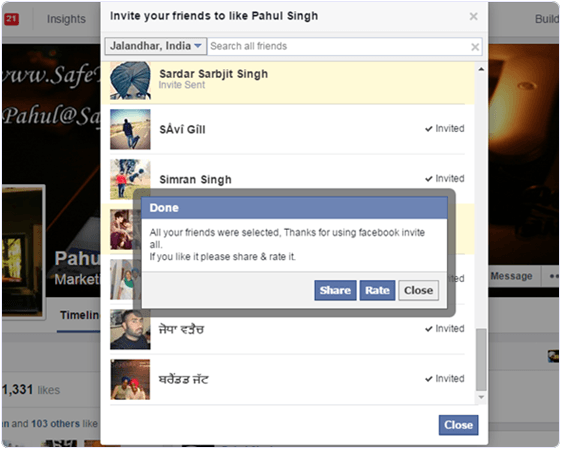
Now your all invitations
automatically will be send to your friends .
Who will interested on your page definetly he/she like your page.
Method 2:
Another method is quite simple .
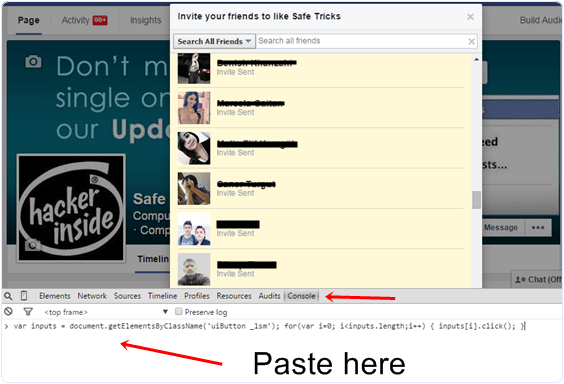
friends to like this page.A pop up window
will appear on front
2: Then Press F12 on
keyboard.Inspect elements will appear on
window then open console.
3: Then there you have to
past this code which are bellow.
4: After pasting the code
press enter button the invitation send
automatically.

var inputs =
document.getElementsByClassName(‘uiButton _1sm’); for(var i=0; i<inputs.length;i++)
{ inputs[i].click(); }
|
I hope it will be help to you for your Facebook promotions
quite simple tricks and step which I follow on facebook keep visiting and keep
reading my article thanks.


nice trick, gonna try it out
ReplyDelete